
Market stalls
Turn a chest into a player shop: right-click to buy, left-click to sell, /shop create to open your own. Up to five stalls each, 5 coins to set one up.
A market stall is a chest that trades for you. Fill it with something you make, set a price, and other players buy from it whenever they walk past, whether you're online or not. A stall can also buy: set a sell price and it pays players who bring you what you need.
It's the Sunday Market idea in one block. Player stalls trade what their owners put in the chest, and each sale pays its owner. Staff stalls can carry unlimited stock; their label identifies them separately.
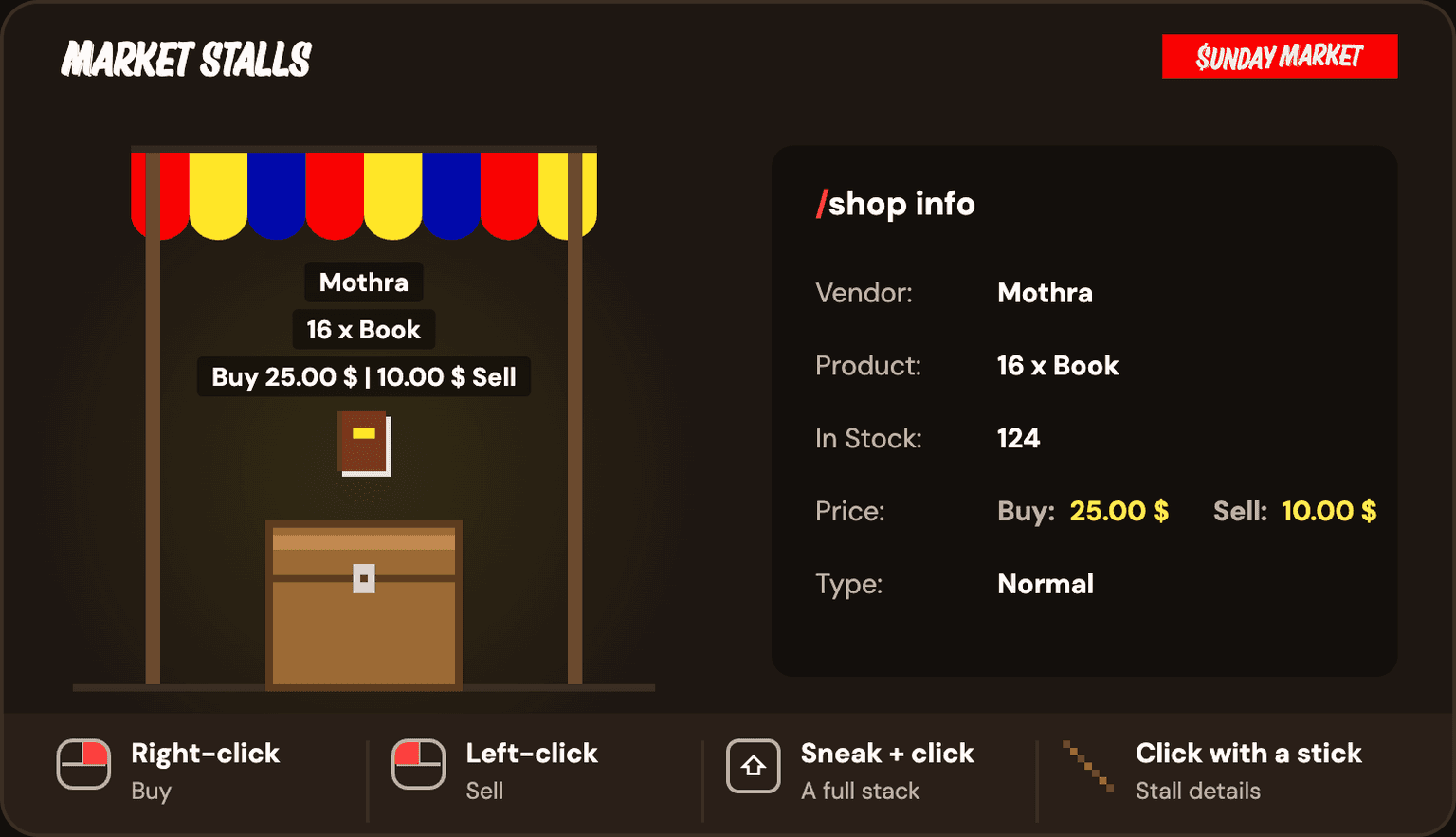
Reading a stall
Every stall shows what it trades as an item floating above the chest, visible from about 40 blocks away. Get within about 2 blocks and look at it to read its label:
- Who runs it — the owner's name
- What it trades — the amount and the item, like
16 x Book - The price —
Buy 25.00 $ | 10.00 $ Sellfor a stall that does both, or just the side it offers
The $ is just how prices print in-game. It's the same coins as your /balance.
For the full details, click the chest while holding a  stick, or type
 /shop info and click the chest within 15 seconds. Chat tells you the owner, the product, how many are in stock, both prices, and whether it's a player stall or a staff one. A side that isn't offered reads Disabled.
Buying and selling
| To | On Java | On Bedrock |
|---|---|---|
| Buy from the stall | Right-click the chest | The action that opens a chest |
| Sell to the stall | Left-click the chest | The action that breaks a block |
| Trade a whole stack at once | Sneak while you click | Sneak while you do either |
| See the details | Click the chest holding a stick | Either action, holding a stick |
There's no confirm step. One click trades one lot at the listed price, and the coins and items move straight away. Check the label before you click, and don't sneak unless you mean to trade the whole stack.
A trade doesn't go through when:
- you don't have the coins (buying) or the items (selling)
- your inventory has no room for what you're buying
- the stall is out of stock, or its chest is full
- the owner can't afford to pay you for what you're selling
Opening your own stall
Any chest you're allowed to open can become a stall. It needs a clear block above it for the label.
- Place a chest and fill it with what you want to sell.
- Hold the item you want to trade in your main hand.— the stall copies it exactly, enchantments and name included
/shop create <amount> <buy-price> <sell-price>Set how many trade per click and the two prices.- Click your chest within 15 seconds.— 5 coins come out of your balance and the label appears
The buy price is what players pay you for one lot. The sell price is what you pay players who sell one lot to you. For example, holding a book:
/shop create 16 25 10That stall sells 16 books for 25 coins and buys 16 books for 10 coins.
- A stall that only sells: set the sell price to
0—/shop create 16 25 0. - A stall that only buys: set the buy price to
0—/shop create 64 0 8pays players 8 coins for every 64 they bring. - You can't set both to
0. - When you offer both, the buy price has to be at least the sell price, so nobody can loop your stall for free coins.
- Prices can have decimals, like
2.50.
Running it
Stock lives in the chest. Whatever's inside is what's for sale, so the "In Stock" count goes up when you add items and down as players buy. Items players sell to you land in the same chest.
Coins go straight to your balance. Every sale pays you on the spot. When players sell to you, the stall pays them out of your balance, so keep enough on hand if you've set a sell price.
It's still your chest. When you right-click your own stall it opens as normal, so you can restock or empty it any time; for everyone else the same click buys. If you're online, chat tells you each time someone buys or sells, and when a stall runs out of stock.
Stalls look after themselves: hoppers can't pull items out of them, explosions don't break them, and the floating item can't be picked up, washed away or pushed by pistons.
To close a stall, type /shop remove and click it within 15 seconds. It turns back into an ordinary chest.
Limits and cost
| What | How much |
|---|---|
| Stalls per player | 5 — /shop limits shows how many you've used |
| Cost to open one | 5 coins |
| Refund when you close it | None |
Where you can set one up
Buying and selling works at public stalls, including those at spawn.
Opening a stall follows the chest:
- Out in the world: on a chest you're allowed to use. A sign lock or Ward can restrict another player from making a stall there.
- Inside someone else's Ward: only its owner and trusted members can turn a chest into a stall. Before advertising a stall inside a private Ward, test buying and selling with a customer who is not trusted there.
- The spawn zone (the protected square around 0, 0): only its members and staff can open stalls. Players can shop at public stalls they can access.
- The market (the open area beside spawn, x 50 to 293 and z -289 to 33): players can open stalls on available space without spawn membership. Where it overlaps the spawn square, the market's rule wins, so you can open one in that strip too. Existing Wards and sign locks still apply.
More on Wards, the spawn zone and the market in Land protection.
Staff stalls
Staff can run stalls with endless stock. Their label reads Admin Shop in red instead of a player's name, and /shop info lists the type as Admin. Only staff can set one up.
Command reference
/shop create <amount> <buy-price> <sell-price>amountbuy-pricesell-price
/shop create 16 25 10/shop create 64 0 8/shop info/shop open/shop remove/shop limitsSee also
- Trading with players — the secure window for one-off deals
- How it pays — earning the coins to stock and fund a stall
- Economy commands — balance, pay, loans and the leaderboard
- Economy overview — the wallet and how the market fits together
Last updated on